Wireless CarPlay Adapter for iPhone & Android (2026 Upgraded) – Complete Review
Introduction
If your car supports wired Apple CarPlay or Android Auto, you probably know how convenient it is for navigation, calls, and media. However, constantly connecting your phone with a cable can become frustrating over time.
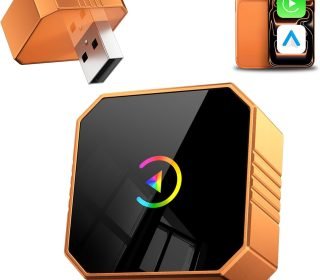
The 2026 Upgraded Wireless CarPlay Adapter aims to eliminate that hassle. It’s a small plug-and-play device that connects to your car’s USB port and automatically pairs with your smartphone.
Once installed, your phone connects wirelessly whenever you start the car. This means:
No cables
Automatic connection
Full access to CarPlay or Android Auto features
The adapter supports iPhone (iOS 10+) and Android devices, making it a versatile solution for households with multiple smartphone types.
Let’s take a closer look at what makes this adapter stand out.
Key Features
1. Wired-to-Wireless Conversion
The primary function of this adapter is converting wired CarPlay or Android Auto into wireless functionality. Once installed, you no longer need to plug your phone into the car’s USB port.
2. Plug-and-Play Setup
Installation is extremely simple:
Plug the adapter into your car’s USB port.
Pair your phone via Bluetooth.
The system automatically switches to wireless mode.
The entire setup usually takes less than a minute.
3. Stable Connection
The adapter uses a combination of Bluetooth and Wi-Fi technology to maintain a stable connection between your phone and the car system.
This helps ensure:
Smooth navigation
Reliable music streaming
Clear voice calls
4. Minimal Latency
One of the biggest concerns with wireless adapters is lag. The 2026 upgraded version claims minimal latency, helping keep maps, music controls, and voice commands responsive.
5. Compact Mini Design
The adapter is small and lightweight, making it easy to keep plugged in without cluttering your dashboard area.
6. Automatic Reconnection
After the initial setup, the adapter automatically reconnects to your phone when you start the car.
This makes the experience feel like built-in wireless CarPlay or Android Auto.
7. Broad Compatibility
The adapter supports:
iPhone devices running iOS 10 or later
Android phones with Android Auto support
Most vehicles that already support wired CarPlay or Android Auto
However, it does not work with vehicles that don’t already have wired CarPlay or Android Auto.
Pros and Cons
Pros
✔ Converts wired CarPlay/Android Auto to wireless
✔ Easy plug-and-play installation
✔ Automatic phone connection
✔ Compact and portable design
✔ Works with both iPhone and Android devices
✔ Helps reduce cable clutter in the car
Cons
✘ Only works with cars that already support wired CarPlay/Android Auto
✘ Initial pairing may take a few minutes for some vehicles
✘ Wireless connection may vary depending on phone and vehicle system
Detailed Review
Design and Build Quality
The 2026 upgraded adapter features a small, minimalist design that fits discreetly into your car’s USB port. Unlike larger adapters, it doesn’t block surrounding controls or create a messy look.
The lightweight build also makes it easy to move between vehicles if needed.
Setup and Installation
One of the strongest advantages of this device is its quick setup process.
Steps typically include:
Plug the adapter into the car’s USB port.
Turn on Bluetooth and Wi-Fi on your phone.
Pair the phone with the adapter.
Once paired, the adapter automatically connects each time you start your vehicle.
Even users with limited technical experience should find the process simple.
Performance
In daily use, the adapter performs similarly to built-in wireless CarPlay systems.
You can easily access:
Navigation apps like Google Maps or Apple Maps
Music streaming apps
Voice assistants
Phone calls and messages
The connection typically remains stable while driving, though performance may vary slightly depending on the car’s infotainment system.
Everyday Convenience
The biggest benefit of this adapter is convenience.
Without it, drivers must:
Take their phone out
Plug in a cable
Disconnect it again after driving
With the wireless adapter, the connection happens automatically.
This is especially useful for short drives, commuting, or rideshare drivers who frequently get in and out of the car.
Who Should Buy This Product
This adapter is a good choice for several types of users.
1. Drivers Who Hate Cables
If plugging in your phone every time you drive is annoying, this adapter removes that step completely.
2. People With Cars That Only Support Wired CarPlay
Many vehicles support CarPlay but only through USB. This adapter upgrades that experience without replacing your car’s infotainment system.
3. Frequent Drivers or Commuters
Drivers who use navigation or music daily will appreciate the automatic connection feature.
4. Families With Both iPhone and Android Devices
Because the adapter supports both platforms, it works well in households where different family members use different smartphones.
Comparison with Similar Products
Wireless CarPlay adapters have become more common, and several alternatives exist. Here’s how this adapter compares in general terms.
| Feature | 2026 Wireless CarPlay Adapter | Typical Basic Adapter |
|---|---|---|
| Setup | Plug and Play | Plug and Play |
| Compatibility | iPhone & Android | Often iPhone only |
| Connection Stability | Stable dual connection | Varies |
| Auto Reconnect | Yes | Sometimes |
| Size | Compact mini design | Often bulkier |
Many basic adapters support only Apple CarPlay, while this model aims to support both CarPlay and Android Auto, which increases flexibility.
However, performance differences can depend on the vehicle’s infotainment system and smartphone model.
Frequently Asked Questions
1. Does this adapter work with any car?
No. Your vehicle must already support wired Apple CarPlay or Android Auto. The adapter only converts that wired connection to wireless.
2. Is the installation complicated?
No. The device is designed for plug-and-play installation. Most users can complete setup within a minute.
3. Will it drain my phone battery faster?
Wireless connections can use slightly more battery compared to wired connections, but most modern smartphones handle this efficiently.
4. Can multiple phones connect to the adapter?
Most adapters can remember multiple devices, but they usually connect to the last paired phone first.
5. Does it support voice assistants?
Yes. You can still use Siri or Google Assistant through your car’s infotainment system.
Final Verdict
The Wireless CarPlay Adapter for iPhone & Android (2026 Upgraded) offers a simple and convenient way to upgrade your car’s infotainment experience.
Instead of plugging in your phone every time you drive, the adapter allows your device to connect automatically. This makes navigation, calls, and music much easier to access while driving.
While it does require a vehicle that already supports wired CarPlay or Android Auto, it can significantly improve the overall driving experience for compatible cars.
For drivers who want the convenience of wireless connectivity without replacing their car’s system, this adapter can be a practical and affordable upgrade.
Affiliate Disclaimer
This article may contain affiliate links. If you purchase a product through these links, we may earn a small commission at no additional cost to you. This helps support our work and allows us to continue providing helpful product reviews.