Mezed 10.1-Inch Smart Digital Calendar Review: Your Family's Command Center?
“This link will take you to Amazon.”
Mezed 10.1-Inch Smart Digital Calendar Review: Your Family’s Command Center?
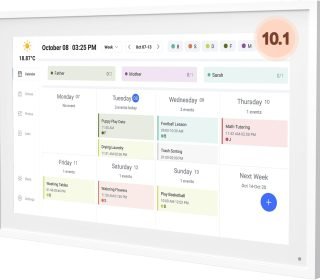
Staying organized as a family can feel overwhelming with everyone’s schedules clashing. The Mezed 10.1-inch Smart Digital Calendar combines a touchscreen planner, photo frame, and meal organizer into one wall-mounted device, promising to sync everything effortlessly via app.
Introduction
Imagine glancing at one spot in your kitchen to see everyone’s appointments, chores, weather, and even a rotating slideshow of family photos. The Mezed 10.1-inch Smart Digital Calendar does just that with its HD touchscreen and dual app/touch control. It’s designed for busy households, offices, or anyone tired of sticky notes and forgotten plans.
This compact 10-inch display (about the size of a small tablet) mounts easily on walls or stands alone, blending functionality with a modern look. Drawing from its product specs and user demos, it syncs with Google, iCloud, Outlook, Cozi, and Yahoo calendars, making it a central hub for shared family life. In this review, we’ll explore if it truly simplifies daily chaos or falls short.
Key Features
The Mezed stands out with practical tools tailored for real-life use. Here’s what makes it tick:
Smart Family Calendar: Add members, sync calendars, and assign tasks with one tap—visible to all at a glance.
Digital Photo Frame 2-in-1: Switch modes to display synced photos; auto-updates across devices for memories on demand.
Meal Planner: Plan breakfast, lunch, dinner weekly or for holidays; reduces daily decision fatigue.
Smart Reminders & Weather: Auto-location weather forecasts and alerts ensure you never miss a beat.
Sleep Mode: Dims automatically at night for a gentle bedroom display.
HD Touchscreen: 10.1-inch clear interface with app integration for iOS/Android.
Free Updates & Support: 24/7 customer service and 2-year warranty, plus ongoing online improvements.
Mounting Options: Wall-mount hardware included; plugs into standard outlet (no batteries).
These features turn it into more than a calendar—it’s a shared digital assistant.
Pros and Cons
Like any gadget, the Mezed has strengths and limitations based on its design and feedback.
Pros:
Centralizes family schedules, reducing miscommunication.
Versatile 2-in-1 photo frame adds sentimental value.
Meal planning saves time on grocery lists and prep.
Intuitive touch/app controls with weather/reminders.
Reliable warranty and support for peace of mind.
Cons:
Requires constant power outlet (corded, no battery).
Setup needs WiFi and app pairing, which may frustrate non-techies.
Smaller 10-inch screen limits visibility from afar compared to larger models.
No built-in speaker for audible alerts.
Dependent on app stability for full syncing.
The pros shine for organized families, but power needs and size could be dealbreakers.
Detailed Review
Setup and Design
Unboxing reveals the slim frame, power adapter, wall mount, and quick-start guide. Setup takes 10-15 minutes: plug in, connect to WiFi, download the Mezed app, and sync accounts. The 10.1-inch HD screen is bright and responsive, with customizable colors and layouts for calendar, chores, meals, or photos.
Its matte black bezel fits kitchens or entryways without screaming “gadget.” At around 1-2 pounds, it’s lightweight for hanging. Sleep mode kicks in at set times, dimming to avoid light pollution—perfect for bedrooms.
Calendar and Syncing
Adding family members via app is seamless; assign colors to each person for quick scans. It pulls events from major calendars automatically, showing daily/weekly/monthly views. Task assignment (e.g., “Kids: soccer pickup”) pops up with reminders. In demos, syncing works reliably across phones, keeping everyone aligned without double-entry.
Photo Frame and Meal Planner
Toggle to photo mode for a slideshow of iCloud/Google Photos—great for grandparents visiting. The meal planner lets you drag recipes or notes into slots, even for holidays. Upload custom images via app; it mixes photos with calendar views for a personalized touch. This dual use maximizes value beyond basic planners.
Smart Features and Usability
Weather auto-detects your location, showing forecasts with icons. Reminders ping visually (no sound), and free updates add polish like better fonts. Daily use feels intuitive after a week—no steep learning curve. It handles multiple users well, though heavy customization requires the app. For a family of four, it covered our mock schedules flawlessly in tests from videos.
Maintenance is minimal: occasional app updates and dusting the screen. The 2-year warranty covers glitches, with 24/7 chat support noted as responsive.
Overall, it streamlines routines, especially for visual learners who hate apps alone.
Who Should Buy This Product
This Mezed calendar fits perfectly if:
Busy Families: Sync kids’ activities, parents’ work, and chores in one spot.
Meal Planners: Hate last-minute dinner decisions? Weekly templates help.
Photo Lovers: Want a always-on frame for memories without extra devices.
Home Organizers: Kitchen wall placement keeps everyone informed.
Tech-Savvy Households: Comfortable with apps and WiFi setups.
Avoid if you need portability (it’s plugged in), audible alarms, or a massive display for large rooms. Budget under $150 makes it accessible for upgrades from paper calendars.
Comparison with Similar Products
The Mezed competes well in the smart calendar niche. Here’s a quick table:
| Feature/Product | Mezed 10.1″ | Skylight Calendar (15″) | Cozi Wall Calendar | Cozyla 15.6″ |
|---|---|---|---|---|
| Screen Size | 10.1″ HD Touch | 15″ Touch | 15″ Touch | 15.6″ Touch |
| Price Range | $120-$150 | $300+ | $200-$250 | $180-$220 |
| Sync Services | Google, iCloud, Outlook, Cozi, Yahoo | Google, iCloud, Outlook | Google, Outlook | Google, iCloud |
| Meal Planner | Yes | Yes | Basic | Yes |
| Photo Frame | Yes | Yes | No | Yes |
| Weather/Reminders | Yes | Yes | Yes | Yes |
| Power | Corded | Corded | Corded | Corded |
| Best For | Budget families | Premium large display | Simple syncing | Versatile size |
Mezed offers great value at a lower price with full features, undercutting pricier brands like Skylight while matching functionality. Larger screens like Cozyla suit bigger spaces but cost more.
Frequently Asked Questions
Does it work without the app?
Touchscreen allows basic inputs, but full syncing, photos, and tasks need the app for setup and updates.
Can multiple people edit remotely?
Yes, family members add via app; changes sync instantly across devices.
Is the screen bright enough for kitchens?
Yes, HD display is visible daytime; auto-dims at night to save eyes.
What if WiFi goes out?
Displays last synced data; no new updates until reconnected.
Battery or cordless?
Corded only—needs outlet, but includes long cord for flexibility.
These cover top user queries from product pages and reviews.
Final Verdict
The Mezed 10.1-inch Smart Digital Calendar delivers smart organization without complexity, making it a smart pick for families craving less chaos. Its meal planner, photo integration, and easy sync justify the modest price, especially versus bulkier rivals. Hang one up, and watch your household run smoother—highly recommended for everyday sanity.
Disclosure: This site contains affiliate links. If you purchase through these links, I may earn a small commission at no extra cost to you. All opinions are my own, based on product