Grazz Laptop Screen Extender Triple Monitor Review (14" FHD) – Is It Worth It for Travel & Productivity?
“This link will take you to Amazon.”
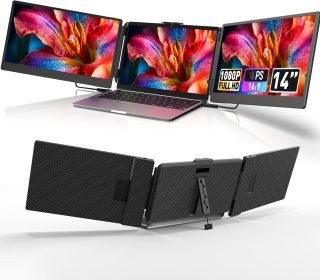
If you’re tired of juggling tabs on a single laptop screen, the Grazz Laptop Screen Extender Triple Monitor (14″ FHD) aims to turn your notebook into a full multi-screen workstation. With a 14-inch 1080P IPS panel, 180° rotation, and support for Windows, Mac, Android, PS5, Xbox, and Switch, it’s designed for remote workers, students, and travelers who want more screen space without carrying bulky monitors.
In this detailed review, we’ll cover its key features, pros and cons, real-world performance, ideal users, comparisons, FAQs, and a final verdict to help you decide if this triple screen extender is a smart investment.
Affiliate Disclaimer: This review contains affiliate links. If you purchase through these links, I may earn a small commission at no extra cost to you. This helps support my work in creating honest, in-depth reviews.
Introduction
Multi-tasking on a 13″–15″ laptop can feel cramped—especially if you work with spreadsheets, video calls, and documents at the same time. The Grazz Laptop Screen Extender Triple Monitor is a portable solution that clips onto your laptop and adds two extra 14″ FHD screens (S2 variant), giving you a true triple-monitor setup wherever you go.
It promises:
Up to 300% productivity boost by expanding your workspace.
Plug-and-play connectivity via USB-C or HDMI.
Portable design with carrying case for travel and business trips.
Rated 3.8 out of 5 stars from 12+ buyers, it clearly has fans—but also some drawbacks you should know about. Let’s break it down.
Key Features
1. 14″ FHD 1080P IPS Display
Resolution: 1920 × 1080 (FHD)
Panel: IPS for better color and viewing angles
Aspect Ratio: 16:9
Contrast Ratio: 1000:1 for decent depth and detail.
Refresh Rate: 60 Hz – perfectly fine for productivity, streaming, and light gaming.
The IPS screen ensures colors remain accurate even when you tilt or pivot the extender.
2. Triple Monitor Extender for 13″–17″ Laptops
Compatible with laptop screens from 13.3″ to 17″, with a maximum horizontal reach of 15.75 inches.
The bracket clamps on top of your laptop and folds out on both sides, giving you left and right side monitors around your main screen (S2 version).
Ideal for multitasking, stock trading, coding, video calls, content creation, and presentation work.
3. Flexible 180° Rotation & Adjustable Angles
Each screen supports up to 180° pivot, so you can rotate for:
Extended mode (wider desktop)
Mirror mode (same content on side screen)
Presentation mode (flip one screen toward a client).
You can tilt and angle the screens for comfortable viewing in different seating positions.
4. Independent Display Settings & Built-In Speakers
Each screen allows independent control of brightness, contrast, volume, and other parameters, so you can tune them to your environment.
Comes with dual built-in speakers for basic video/audio playback.
5. Broad Compatibility & Connectivity
Works with:
Windows laptops (most modern models)
Mac (Intel-based)
Android (with video output)
PS5 / PS4, Xbox, Nintendo Switch as external displays.
Ports & Cables Included:
2 × USB-C to USB-C
1 × HDMI to USB-C
2 × USB-A to USB-C
This gives flexibility whether your laptop uses USB-C with DisplayPort, HDMI, or older USB-A (with power + video combos).
6. Portable & Travel-Friendly
Weight: Around 3.57 lbs for the S2 model (two 14″ screens), including the bracket.
Foldable design and carrying case for travel, commuting, or hot-desking.
Designed as a portable workstation for business trips, co-working spaces, and remote work.
7. Warranty & Quality Assurance
Each monitor goes through pre-shipment testing.
Includes 12-month manufacturer warranty.
Brand encourages users to contact Grazz support for compatibility and setup help.
Pros and Cons
Here’s a quick overview to help you decide faster.
Pros
True triple-monitor setup from a single laptop – ideal for serious multitaskers.
Good 14″ FHD IPS panels with decent colors and viewing angles.
Works with both Windows and Mac (Intel) plus Android and consoles.
Flexible 180° rotation for collaboration and presentations.
Comes with all necessary cables and a carrying case – no need to buy extras.
Foldable and relatively portable for a dual-screen extender.
Cons
3.8/5 rating suggests some mixed experiences—often about weight, setup, or compatibility edge cases.
At around £185.98 (S2 variant), it’s not cheap—aimed at power users rather than casual buyers.
Adds extra weight and thickness to your laptop, which you’ll feel in a backpack.
You need a laptop with enough GPU output and ports (or adapters) to drive three screens smoothly.
Official support mentions Mac with Intel processors, so Apple Silicon (M1/M2/M3) users may require additional adapters or DisplayLink solutions depending on model.
Detailed Review
Design & Build Quality
The Grazz extender uses a clamp-style bracket that attaches to the top of your laptop. The two 14″ panels slide or fold out from either side, creating a panoramic triple-screen layout.
The design is functional and professional, more aimed at work than gaming aesthetics.
The screens have a glossy finish, which makes colors pop but may introduce reflections in bright environments.
The bracket feels sturdy enough for most 13–17″ laptops, though you’ll want to be careful with very thin ultrabooks.
Setup & Ease of Use
Setup process in real life usually looks like this:
Clamp the bracket onto the top of the laptop screen.
Pull out the side screens and adjust them to align with your main screen.
Connect cables:
If your laptop has USB-C with DisplayPort, you often just plug one USB-C cable per screen.
If you only have HDMI + USB-A, you use the HDMI-to-USB-C plus USB-A-to-USB-C for power and data.
Configure display settings in Windows/Mac to “Extend” or “Mirror.”
Most users report that once it’s configured the first time, plugging in becomes plug-and-play afterwards, especially on Windows.
Performance & Image Quality
FHD 1080p on a 14″ panel is sharp enough for spreadsheets, code, documents, and content consumption.
IPS technology provides better viewing angles and color uniformity than older TN panels.
Colors are vibrant but not color-critical – perfectly fine for office work, browsing, and media, less ideal for high-end color grading.
60 Hz refresh rate is standard for productivity and casual gaming.
In everyday use, the screens are more than adequate for:
Multiple browser windows
Email + chat apps
Editing documents while watching reference materials
Video calls with shared screen on one monitor
Portability & Everyday Use
At around 3.57 lbs, the Grazz extender is heavier than a single portable monitor, but you’re getting two screens and a mounting frame.
Good for:
Working from cafes or co-working spaces
Business trips and hotel desks
Students who move between home, library, and class
Less ideal for:
Minimalist travelers carrying very small backpacks
Very old or underpowered laptops that might struggle driving multiple 1080p displays
Compatibility Notes
Based on the product details and similar extenders:
Windows: Usually the smoothest experience, especially on machines with at least one USB-C (DP) or HDMI plus adequate GPU.
Mac (Intel): Supported, though you may be limited in how many additional displays MacOS allows depending on model.
Apple Silicon: Not explicitly supported in the listing; users often need extra adapters or DisplayLink docks for more than one external display.
Android, PS5/PS4, Xbox, Switch: Work as simple external monitors for media and gaming, not as triple-extended setups.
Who Should Buy This Product?
The Grazz Triple Laptop Screen Extender is best suited for:
Remote workers & digital nomads who want a mini office setup on the go.
Programmers, analysts, and traders handling multiple windows, charts, and logs.
Content creators & marketers needing reference material open while editing or writing.
Students managing notes, research, and lectures simultaneously.
Professionals doing presentations – one side facing the client, one facing you.
You might want to skip or reconsider if:
You only occasionally need a second screen—then a single portable monitor might be cheaper and lighter.
You have a very light, fragile ultrabook and are worried about extra weight on the lid.
Your budget is tight and you don’t rely on multi-monitor workflows daily.
Comparison with Similar Laptop Screen Extenders
Here’s a quick comparison table to position Grazz against typical alternatives:
| Feature / Product | Grazz Triple Extender (S2) | Generic 14″ Single Portable Monitor | QQH / G-Story Triple Extender (15.6″) |
|---|---|---|---|
| Screen Size | 2 × 14″ FHD IPS | 1 × 14″ FHD IPS | 2 × 15.6″ FHD IPS |
| Resolution | 1920 × 1080 @ 60 Hz | 1920 × 1080 @ 60 Hz | 1920 × 1080 @ 60 Hz |
| Laptop Compatibility | 13.3″–17″ | 13″–17″ | 12″–16″ (varies) |
| Rotation / Pivot | Up to 180° per screen | Usually limited tilt only | 180° (model dependent) |
| Ports & Cables Included | USB-C, USB-A, HDMI cables | Typically 1–2 cables | USB-C & HDMI |
| Weight | ~3.57 lbs (both screens) | ~1.3–2.0 lbs | Heavier than Grazz |
| OS Compatibility | Windows, Mac (Intel), Android, Consoles | Windows/Mac/Android (varies) | Often Windows-first |
| Typical Price (deal) | ~£185.98 | £80–£150 | £220+ |
| Best For | Heavy multitaskers on laptops | Light users needing one extra screen | Power users with larger laptops |
Frequently Asked Questions
1. Does it work with all laptops?
It fits 13.3″–17″ laptops physically and supports devices with video-capable USB-C or HDMI outputs. Older laptops without these ports may require adapters.
2. Does it support MacBook Air/Pro?
It supports Intel-based Macs. For Apple Silicon models, check how many external displays your specific Mac supports and whether you need a DisplayLink dock.
3. Can I use only one side screen at a time?
Yes, you can usually use one or both screens depending on your cable setup and needs.
4. Is it plug-and-play?
On most modern Windows laptops with USB-C DP or HDMI, it’s essentially plug-and-play after initial display configuration. On Macs and older systems, you may need to tweak settings or use adapters.
5. Is it good for gaming?
It’s fine for casual gaming, console use, and cloud gaming thanks to 1080p/60 Hz. For competitive gaming, a dedicated high-refresh external monitor is better.
6. How portable is it really?
It’s portable for a dual-screen extender, folds into a carrying case, and fits in a backpack. But it is heavier than a single portable screen, so factor that into travel decisions.
Final Verdict
The Grazz Laptop Screen Extender Triple Monitor (14″ FHD) is a powerful productivity booster for people who live in multiple windows all day. With:
Dual 14″ 1080P IPS panels
Flexible 180° rotation
Wide compatibility with Windows, Intel Mac, Android, and consoles
Included cables and carrying case
…it delivers a flexible, travel-friendly triple-monitor experience for laptops sized 13–17 inches.
Its 3.8/5 rating reflects strong use-cases with some trade-offs: added weight, price, and the need to check port compatibility first. If you’re a remote worker, student, or digital nomad who truly benefits from triple screens, it’s a solid, high-impact upgrade. If you only occasionally need an extra screen, a single portable monitor may be a more budget-friendly alternative.