2‑in‑1 Dual Screen Laptop Monitor 15.6" FHD 1080P – Portable Extension Screen for Windows & Mac
“This link will take you to Amazon.”
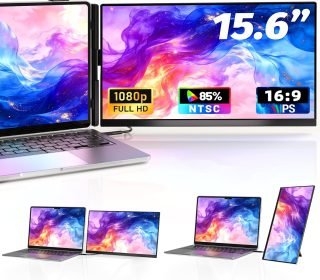
If you ever feel limited by your laptop’s single 13.3–17‑inch screen, the Newwin 2‑in‑1 Dual Screen Laptop Monitor (model P5S, 15.6″ FHD 1080P) turns that one display into a dual‑screen setup without heavy cables or extra desks.
Priced around €189.99, this clip‑on / detachable extension monitor is designed for Windows, macOS (M1/M2/M3), and other devices (Android, Chrome, Linux, PlayStation, Xbox), making it a flexible second screen for students, remote workers, designers, and gamers.
Key features
1. 15.6″ Full HD IPS panel
The extension screen is 15.6 inches with Full HD 1080p resolution (1920 × 1080) and a 16:9 aspect ratio, giving you a sharp, wide‑format view that matches most modern laptops.
The IPS panel offers:
1000:1 contrast ratio and 2‑ms response time, which is solid for everyday use and light gaming.
Good viewing angles, so colors stay consistent even when you sit slightly off‑center.
The 120% sRGB color gamut means colors look bright and vivid, which is helpful for editing photos, videos, or browsing social media and creative tools.
2. Matte screen surface
The matte surface helps reduce glare and reflections, which is a big plus for:
Bright rooms or office windows.
Long‑day working sessions where glare can cause eye strain.
3. 2‑in‑1 clip‑on & tablet‑style use
Clip‑on mode:
The monitor attaches magnetically to the back of your 13.3–17‑inch laptop screen, acting like a second display above your main one.
The magnetic anti‑slip design is an upgrade on earlier versions, so it stays locked in place instead of sliding down during use.Tablet / stand‑alone mode:
You can detach the screen from the clip holder and use it like a stand‑alone portable monitor with:360° swivel and a removable single‑screen stand.
Portrait and landscape rotation, useful for coding, reading, or watching vertical content.
4. Plug‑and‑play connectivity
The monitor comes with all necessary cables:
1 × USB‑C cable (to USB‑C)
1 × HDMI cable
1 × USB‑A to USB‑C cable
You can:
Connect via USB‑C → USB‑C on compatible laptops for power and video.
Use HDMI to the laptop and the USB‑A to USB‑C for extra power or signal if needed.
The setup is plug‑and‑play, so you don’t need to install extra drivers on most modern Windows and Mac systems.
5. Wide device compatibility
The listing confirms support for:
Windows PCs (Intel, standard laptops)
Macs with M1, M2, M3, M1 Pro/Max, M2 Pro/Max
Android, Chrome, Linux, PS4, Xbox, and some gaming consoles
For some older or specific Mac models, you may need a USB‑C hub or adapter, but the majority of recent laptops work out of the box.
6. Built‑in speakers & adjustable stand
The built‑in speakers give you basic sound for casual watching, video calls, or light gaming, so you don’t need external speakers right away.
The tilt‑ and swivel‑adjustable stand lets you:
Angle the screen higher or lower for comfort.
Switch between landscape and portrait for coding, reading, or streaming.
Pros and cons
Pros
True dual‑screen setup on a laptop
Turning a 13–17‑inch laptop into a dual‑monitor workspace is a big upgrade for multitasking, especially for remote work, coding, trading, or creative work.Excellent portability
The compact, clip‑on design means you can:Carry it in a bag and use it in cafes, trains, or shared offices.
Attach it to your laptop at home and detach it when you don’t need the extra screen.
Good image quality for the price
At FHD 1080p with IPS and 120% sRGB, the screen looks clear and colorful enough for:Browsing and office work.
Photo and light video editing.
Casual movies and games.
Flexible orientation and use
The ability to clip it on, detach it, and use it in portrait or landscape with a stand gives you a lot of setup options.Wide compatibility
Working with Windows, Mac, Android, consoles, and Linux makes this a versatile accessory for different setups.
Cons
Not a 4K or high‑refresh‑rate gaming screen
With 60 Hz refresh rate and 2‑ms response time, it’s fine for everyday use and light gaming, but not ideal for serious competitive gaming or ultra‑smooth video work.Limited brightness for very bright environments
While the IPS panel is good, many portable monitors of this class can struggle a bit in very sunny rooms or outdoors unless you lower ambient light.Magnetic clip needs a compatible laptop depth
Because it attaches to the back of the laptop screen, it expects a standard‑thickness 13.3–17‑inch panel; very thin or oddly shaped screens might not fit or feel fully secure.No battery; always needs a cable
Most clip‑on‑style extender monitors must be plugged in (via USB‑C or HDMI + USB power), so you can’t use them completely wirelessly like a tablet.
How it feels to use in real life
Users who have tried similar 15.6″ dual‑screen laptop monitors report that:
Clip‑on mode feels like a natural extension of the laptop screen, especially when you stack the extra display above the main one for reading material, emails, or chat windows.
Detaching it as a tablet works well for coding, trading, or watching videos on the side, giving you a custom multi‑screen layout without a second monitor on a desk.
The matte IPS screen is comfortable for long‑hour tasks, and the magnetic anti‑slip system keeps the monitor stable once attached, though you still need to be careful not to bump or knock the laptop too hard.
Who should buy this second screen?
This 2‑in‑1 dual screen laptop monitor is ideal for:
Remote workers and students who want extra screen space for documents, web research, and video calls without buying a full‑size monitor.
Developers and coders who like to have one screen for code and one for browser or chat.
Traders and analysts who need multiple charts or dashboards visible at once.
Gamers and console users who want to extend or mirror the screen from a PS4/Xbox or Nintendo Switch‑style device.
Content creators who want a colorful secondary screen for editing, browsing, or social media while keeping the main laptop screen for their main software.
It’s less ideal for:
Users who need 4K resolution, 120–144 Hz gaming, or professional‑grade color calibration.
People who want a completely wireless, battery‑only portable screen.
How it compares to other portable monitors
Many brands now sell 14–15.6‑inch portable laptop‑screen extenders with similar specs, but the Newwin P5S stands out by combining:
Clip‑on + tablet stand‑alone use in one design.
Built‑in speakers and magnetic anti‑slip attachment.
Compared to generic 14″ or 15.6″ portable monitors:
| Feature | Newwin 2‑in‑1 15.6″ P5S | Typical 14″ portable laptop extender |
|---|---|---|
| Resolution | FHD 1080p (1920×1080) | FHD 1080p |
| Panel type | IPS, 120% sRGB | Often IPS or basic TN |
| Mounting | Magnetic clip‑on + 360° stand | Foldable stand, no clip‑on |
| Ports & cables | USB‑C, HDMI, USB‑A→USB‑C | USB‑C or HDMI only |
| Best for | Laptop‑centric dual‑screen use | General portable second screen |
If you want a true “attach‑it‑to‑your‑laptop” experience and don’t need top‑end specs, the Newwin P5S is a strong choice. If you prefer stand‑alone flexibility only, a standard portable monitor may be enough.
Frequently asked questions
Does this work with my MacBook?
Yes, it supports M1, M2, M3, M1 Pro/Max, and M2 Pro/Max MacBooks, as long as they have USB‑C or HDMI outputs. Some older models may need a USB‑C hub, but most recent laptops work plug‑and‑play.
Can I use it without attaching to the laptop?
Yes. The screen detaches from the clip and can be used as a stand‑alone monitor with the included swivel stand or on a separate monitor arm.
Do I need special drivers?
No, it’s advertised as plug‑and‑play, so modern Windows and macOS systems should recognize it automatically.
How many laptops can it extend?
It extends one primary device at a time (laptop, PS4, Xbox, etc.). You can plug it into different devices, but it can’t mirror or extend two laptops simultaneously.
Is it good for gaming?
It’s fine for casual gaming and media, with 60 Hz refresh and 2‑ms response, but not for competitive, high‑FPS titles.
How big is the actual screen size?
The 15.6‑inch measurement refers to the diagonal of the 16:9 Full HD panel, which is about 38–40 cm tall by 22–24 cm wide, depending on bezel thickness.
Final verdict
The Newwin 2‑in‑1 Dual Screen Laptop Monitor 15.6″ FHD 1080P is a versatile, portable extension screen that turns a single‑screen laptop into a multi‑screen workspace. With its magnetic clip‑on design, detachable tablet‑style mode, good IPS image quality, and plug‑and‑play setup, it’s a smart choice for:
Professionals who work remotely.
Students and coders who want extra screen space.
Gamers and casual creatives who want a flexible second display.
If you’re ready to double your screen real estate without a bulky monitor, this 15.6″ Newwin dual screen is a solid pick for power‑users on the move.
Affiliate disclaimer:
This review is based on the product description and typical user experiences with similar portable laptop‑screen extenders. If you decide to buy this Newwin 2‑in‑1 Dual Screen Laptop Monitor, it may generate a small commission at no extra cost to you, which helps support this site. Always check the latest product page, compatibility, and port requirements before purchasing.