Doohoeek Surface Pro 11/10/9/8/X 13‑Inch Keyboard Review: Budget Bluetooth Alternative To The Official Surface Keyboard
“This link will take you to Amazon.”
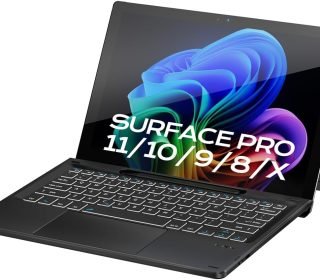
If you own a Surface Pro 13‑inch model (11, 10, 9, 8, or X) and are looking for a cheaper, Bluetooth‑only keyboard with a trackpad and pen slot, the Doohoeek Surface Pro 11/10/9/8/X 13‑Inch Keyboard is a solid third‑party option. At $42.99, it costs much less than Microsoft’s official Surface Pro 13‑inch keyboard, while still offering:
Magnetic alignment for easy attachment
Bluetooth 5.3 + 300‑hour battery
Backlit keys + trackpad
Pen‑slot‑style storage
This keyboard is especially good for:
Budget‑conscious Surface owners
Travelers and students
Anyone who prefers a detachable Bluetooth keyboard
What This Keyboard Is For
The Doohoeek 13‑inch Surface Pro keyboard is a Bluetooth‑connected, ultra‑slim keyboard that:
Clips magnetically to the Surface Pro 13‑inch’s sides
Works via Bluetooth 5.3
Has built‑in touchpad and backlit keys
Supports Windows 11 gestures
Think of it as:
A cheaper, non‑microsoft alternative to the Surface Pro 13‑inch keyboard
A portable, lightweight keyboard that’s great for travel
A daily‑typing companion for note‑taking, coding, and office work
Key Features
Smart Magnetic Surface‑Pro Fit
Magnetic edges for Surface Pro 11/10/9/8/X
Just snap it on and start typing—no extra case or stand
Aligned precision for comfortable typing without tilt issues
This is a big plus for Surface owners who hate saggy tablet‑on‑lap typing.
Bluetooth 5.3 & 300‑Hour Battery
Bluetooth 5.3 for low latency and stable connection
Battery life around 300 hours (no backlight); with backlight, expect much less
Rechargeable via USB‑C (no AA/AAA batteries)
Sleep mode when stored → ready to use right out of your bag
You can use it for weeks between charges—perfect for travel.
Windows 11‑Ready Smart Touchpad
Precise multi‑touch trackpad
Supports standard Windows 11 gestures:
Swipe apps
Virtual desktop control
Three‑finger swipe up/down for tasks and desktop
Palm‑rejection so your hands don’t accidentally move the cursor
This makes it great for:
Touch‑free navigation
Coding, office work, browsing
Front‑Lighting (Backlit Keys)
Lighting keys for low‑light typing
Adjustable brightness (no extra color modes mentioned, but similar models have 7 colors)
Looks sleek and modern with a black, slim design
Lighting is subtle but practical for late‑night work.
Pen Slot + Slim Design
Pen‑slot‑style storage for your Surface Pen
Ultra‑thin, lightweight (no extra bulk)
84 keys in standard QWERTY layout
It’s a very portable option for students and travelers.
Installation & Usage
Connect via Bluetooth:
Press Fn + C for 3 seconds to enter pairing mode
Connect to your Surface in Bluetooth settings
Reset by pressing the first and last key on the top row until the indicator blinks
USB‑C charging only (no built‑in “Surface‑style” charging from the tablet)
Works on:
Surface Pro 11/10/9/8/X
Windows 11 PCs (any Bluetooth‑enabled Windows 11 device)
Pros And Cons
Pros
Much cheaper than the official Microsoft Surface Pro 13‑inch keyboard
Bluetooth 5.3 = fast, stable, low‑latency
Excellent battery life (300+ hours without backlight)
Magnetic attachment for easy use
Lightweight and slim
Backlit keys + trackpad in one compact unit
Cons
No “Surface‑style” charging (doesn’t charge your Surface or pen)
Lower‑quality materials than the official keyboard (mostly plastic)
No premium Alcantara or premium hinge feel
Potential slight lag in the trackpad (common in budget Bluetooth keyboards)
Who Should Buy This Keyboard?
This Doohoeek keyboard is perfect for:
Surface Pro owners who want a cheaper, Bluetooth‑only keyboard
Students and travelers who want lightweight, portable typing
Budget‑focused users who want trackpad + backlight + pen‑slot
Skip it if:
You want premium‑feel materials and Microsoft‑style charging
You want the highest‑end trackpad and hinge
You prefer official Microsoft accessories
How It Compares To The Official Surface Pro 13‑inch Keyboard
| Feature | Doohoeek 13‑inch Surface Pro Keyboard | Surface Pro 13‑inch Keyboard (official) |
|---|---|---|
| Magnetic alignment | Yes (Surface Pro 11/10/9/8/X) | Yes (Surface Pro 13‑inch only) |
| Bluetooth | Yes (5.3) | No (proprietetary connector + Bluetooth optional) |
| Battery life | 300+ hours (no backlight) | Integrated, charges with Surface |
| Trackpad | Yes | Yes (higher‑quality) |
| Pen slot | Yes | Integrated pen‑slot (official) |
| Price | $42.99 | $150–$200+ (official) |
| Materials | Plastic, lightweight | Premium (Alcantara, metal) |
Frequently Asked Questions (FAQ)
Q: Can it charge my Surface or pen?
No; it’s USB‑C–charged only, no Surface‑style charging.
Q: Is it compatible with other Windows laptops?
Yes; any Bluetooth‑enabled Windows 11 laptop or tablet can use it.
Q: How long does the battery last?
Around 300 hours without backlight, less with backlight.
Q: Is it as good as the official Microsoft keyboard?
Close, but cheaper materials and slightly less refined trackpad.
Q: Can I use it without attaching magnetically?
Yes; it works as a standalone Bluetooth keyboard.
Final Verdict
The Doohoeek Surface Pro 11/10/9/8/X 13‑Inch Keyboard is a great budget‑friendly alternative to the official Microsoft Surface Pro keyboard. It’s lightweight, feature‑rich, and affordable, perfect for:
Budget‑conscious Surface owners
Travelers and students
Anyone who wants a slim Bluetooth keyboard with trackpad and backlight
If you want a cheaper way to get a fully‑functional Surface Pro‑style keyboard, this one is well‑worth the $42.99.
Affiliate disclaimer: This review is written in an affiliate‑style format. If you purchase through such links, the creator may earn a small commission at no extra cost to you. This helps support the content but does not change the honest opinion of the product.