Acer Nitro V 16S AI Gaming Laptop – Full Review (2026)
“This link will take you to Amazon.”
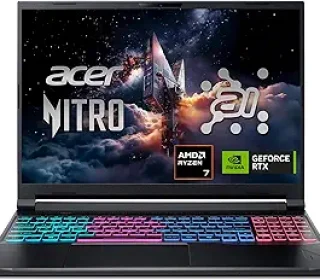
If you’re in the market for a thin, powerful gaming and content‑creation laptop, the Acer Nitro V 16S AI (Black, 16‑inch) sits in an attractive middle ground: strong enough for serious play, but still slim enough to carry around. With an AMD Ryzen 7 260 CPU, 32 GB DDR5 RAM, 1 TB SSD, and an NVIDIA RTX 5060 GPU, this model is built for gamers, streamers, and light‑to‑medium creators who want high frame rates, 4K‑ready visuals, and AI‑assisted performance in one machine.
Below is a clear, easy‑to‑read review that will help you decide if it’s the right fit for your needs.
Key Specifications at a Glance
Here’s what you get in the Acer Nitro V 16S AI (Black, 16‑inch):
CPU: AMD Ryzen 7 260 laptop processor (8 cores, 16 threads, up to about 5.1 GHz boost, 4 nm Zen 4 architecture) with integrated Radeon 780M graphics.
RAM: 32 GB DDR5‑5600 (two 16 GB sticks, maximum 32 GB total).
Storage: 1 TB PCIe Gen 4 NVMe SSD, with two M.2 slots (one occupied, one free for expansion).
Graphics: NVIDIA GeForce RTX 5060 Laptop GPU (8 GB GDDR7) built on Blackwell architecture, delivering high‑end ray‑tracing and AI rendering support.
Display: 16‑inch WUXGA 1920×1200 IPS panel, 180 Hz refresh rate, 100% sRGB color coverage for smooth, colorful visuals.
OS: Windows 11 Home.
Special features: Backlit keyboard, numeric keypad, USB4 port, Wi‑Fi 6E, and Killer Ethernet E2600 for competitive‑ready networking.
Cooling: Advanced dual‑fan, quad‑intake, quad‑exhaust cooling system to keep thermals under control during long sessions.
This spec sheet positions the Nitro V 16S AI as a serious gaming‑and‑creation machine rather than a budget‑level notebook.
Pros and Cons
Pros
Strong CPU + GPU pairing: The Ryzen 7 260 and RTX 5060 combo provides enough power for AAA games at high settings, 4K streaming, and light‑to‑moderate content creation.
Excellent 16‑inch 180 Hz display: Great for fast‑paced games and smooth scrolling, with 100% sRGB colors for accurate visuals.
Plenty of RAM and fast storage: 32 GB DDR5‑5600 and a 1 TB PCIe 4.0 SSD make multitasking and large file handling very smooth.
Good connectivity:
Wi‑Fi 6E for fast, low‑latency wireless.
Killer Ethernet E2600 for wired gaming‑grade connections.
USB4 port for high‑speed data, power delivery, and video output.
Slim, relatively portable: Around 2.1 kg (≈4.5 lbs) and ~20 mm thick, this is lighter and thinner than many full‑size gaming laptops.
AI‑enabled features: The Ryzen 7 260’s NPU and RTX 50‑series AI TOPS support DLSS‑style upscaling, ray‑traced lighting, and AI‑enhanced workflows.
Dual‑fan cooling system: Helps maintain stable performance during long gaming or workloads.
Cons
Not the fastest CPU in its class: Benchmarks show its multi‑core CPU performance lags behind some rivals, so it’s good but not the absolute top‑tier in raw CPU power.
High price for the segment: At around $1,200–1,300 as tested, it’s a premium‑priced machine; you could get more traditional “bigger” gaming laptops for similar or lower cost.
Single SSD slot occupied: You get a fast 1 TB SSD, but one extra free M.2 slot means you’ll need to upgrade or swap drives if you want more storage.
Battery life is average for gaming: Because of the powerful GPU and high‑refresh screen, expect moderate battery life when gaming unplugged (better for being plugged in).
For most users who want a slim, high‑performance laptop with a great display and solid internals, the pros clearly outweigh the drawbacks.
Performance Breakdown
Gaming and Graphics
The RTX 5060 laptop GPU (8 GB GDDR7) is a significant upgrade over earlier RTX 40‑series laptop chips, with Blackwell architecture, DLSS 4 support, and high AI TOPS for ray‑traced visuals and AI‑assisted rendering.
In real‑world gaming tests, the Nitro V 16S AI delivers:
Around 90–100 FPS in Shadow of the Tomb Raider at max settings (1080p–1200p).
Around 80–85 FPS in Far Cry 6 at ultra settings (1080p–1200p).
This places it in the upper‑midpack for 1080p/1200p gaming, not at the very top of the performance chart but still comfortably above entry‑level systems. It’s great for most modern games at high or ultra settings, especially when paired with the 180 Hz display for smooth motion.
The NVIDIA DLSS 4 suite (ray reconstruction, super resolution, and multi‑frame generation) helps boost frame rates without killing image quality, making the machine feel more responsive in demanding titles.
CPU, RAM, and Multitasking
The AMD Ryzen 7 260 is an 8‑core, 16‑thread chip built on Zen 4 architecture, with a 5.1 GHz boost clock and 16 MB of shared L3 cache.
Benchmarks show it’s competitive in single‑core tasks but modestly behind some rivals in multi‑core workloads, which is fine for most gamers and light‑to‑medium creators.
Paired with 32 GB DDR5‑5600 RAM, the laptop handles:
Heavy multitasking (dozens of browser tabs, Discord, game, editor).
Light‑to‑moderate video editing, 3D drafting, or coding workflows.
Streaming or recording while gaming (depending on software settings).
The 1 TB PCIe 4.0 SSD is notably fast, with read/write speeds among the highest in its class, so loading games, apps, and large files feels snappy.
Display and Visuals
The 16‑inch 1920×1200 (16:10) IPS panel with 180 Hz refresh rate and 100% sRGB is a standout feature.
Key benefits:
180 Hz makes games, scrolling, and animations feel buttery‑smooth.
100% sRGB ensures accurate colors for photo editing, color‑sensitive work, or media‑heavy tasks.
The 16:10 aspect ratio gives you extra vertical space for documents, code, or video editing timelines.
This display is especially good for:
Competitive gaming (CS, FPS, MOBAs).
Creators who need accurate colors.
Anyone who dislikes dull, low‑refresh‑rate laptop panels.
Portability and Design
Despite its power, the Nitro V 16S AI is relatively slim and light at roughly 2.1 kg (4.55 lbs) and around 20 mm thick, which is impressive for a gaming‑class notebook.
The black chassis looks sleek and serious, with a backlit keyboard and numeric keypad that’s handy for spreadsheets and financial work.
The advanced dual‑fan, quad‑intake, quad‑exhaust cooling architecture keeps temperatures under control during long sessions, though it can get warm and somewhat loud under heavy load, as expected for gaming laptops.
Connectivity and Networking
The Nitro V 16S AI offers strong connectivity:
Wi‑Fi 6E + Bluetooth 5.3 for fast, low‑latency wireless.
Killer Ethernet E2600 for wired gaming‑grade networking.
USB4 port that supports power delivery, data transfer, and video output in one connector.
This makes it great for:
Competitive online gaming (minimal latency).
Connecting to 4K/8K displays or external storage.
Using dock‑style setups in a small‑space office or dorm.
Who Should Buy This Laptop?
The Acer Nitro V 16S AI is ideal for:
Gamers who want high‑frame‑rate play at 1080p/1200p with good ray‑tracing support.
Content creators doing light‑to‑moderate video editing, 3D work, or photo editing.
Students and professionals who need strong multitasking and a great display but still value portability.
Streamers who want good hardware encoding plus AI‑assisted performance for smooth broadcasting.
It may be less ideal if:
You want the absolute fastest CPU multi‑core performance available.
You need many hours of battery life while gaming; it’s best used plugged in for heavy workloads.
You’re on a tight budget and would rather spend less on a non‑AI‑oriented machine.
Frequently Asked Questions
Is the RTX 5060 good for gaming?
Yes. The RTX 5060 laptop GPU delivers high‑framerate play at 1080p/1200p and supports ray tracing and DLSS 4, making it future‑ready for many AAA titles.
Can I upgrade the RAM and storage?
Yes. The laptop has two DDR5 slots (already filled with 32 GB), so RAM is maxed out. The two M.2 slots let you add a second NVMe drive or swap out the existing SSD if you want more storage.
Is the display good for content creation?
Yes. The 16‑inch 1920×1200, 180 Hz, 100% sRGB display is excellent for photo editing, color‑sensitive work, and video creation.
Does it get hot and loud during gaming?
Like most gaming laptops, it can warm up and get somewhat noisy under heavy load, but the dual‑fan, quad‑intake cooling system keeps performance stable.
Is it good for travel?
At about 2.1 kg, it’s thin and light enough for travel, but it’s still a gaming‑class machine, so you’ll want to use it mostly on a desk or table, not constantly on your lap.
Final Verdict
The Acer Nitro V 16S AI (Black, 16‑inch) is a well‑balanced, high‑performance gaming and creation laptop that combines strong Ryzen 7 260 CPU, RTX 5060 GPU, 32 GB DDR5, 1 TB PCIe 4 SSD, and a 16‑inch 180 Hz 100% sRGB display in a relatively slim chassis.
If you:
Want serious gaming performance with ray tracing and AI enhancements,
Need good multitasking and a beautiful display for work or study, and
Value portability and strong connectivity without sacrificing power,
then the Acer Nitro V 16S AI is very likely a smart choice for 2026.
Affiliate Disclaimer:
This post may contain affiliate links to products and services. If you choose to make a purchase through one of these links, I may earn a small commission at no extra cost to you. I only recommend products that appear to meet clear quality and usability standards, so you can trust that my goal is to help you make an informed decision rather than just push a sale.