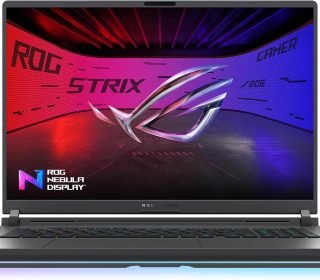
ASUS ROG Strix G18 G815LW‑S9023W is a beast of a gaming laptop
“This link will take you to Amazon.”
Introduction
The ASUS ROG Strix G18 G815LW‑S9023W is a beast of a gaming laptop built for people who want maximum performance without compromise. With an 18‑inch 2.5K Nebula display, an Intel Core Ultra 9 processor, NVIDIA GeForce RTX 5080 graphics, 32 GB of RAM, and 1 TB of fast SSD storage, this machine is aimed at serious gamers, content creators, and power‑users who refuse to settle for average.
In this review, we’ll walk through its display, performance, build quality, battery life, keyboard, and overall value so you can decide whether the ASUS ROG Strix G18 G815LW‑S9023W is the right upgrade for your setup.
Key Features
Stunning 18‑inch 2.5K Nebula display (2560×1600, 16:10)
The 18‑inch IPS‑level panel offers 240 Hz refresh rate, 3 ms response time, 100% DCI‑P3 coverage, and up to 500 nits peak brightness. This makes fast‑paced games look incredibly smooth and videos and photos pop with rich, accurate colors.Intel Core Ultra 9 275HX processor
The 24‑core Intel Core Ultra 9 275HX brings extreme multi‑threaded performance with up to 65 W cooling capacity in manual mode, making this laptop ideal for heavy gaming, streaming, rendering, and AI‑assisted workloads.NVIDIA GeForce RTX 5080 (175 W)
The RTX 5080 GPU delivers top‑tier gaming performance at 2.5K and supports advanced features like ray tracing, DLSS, and NVIDIA Advanced Optimus for smooth, tear‑free gameplay with G‑Sync‑compatible content.32 GB DDR5–5600 RAM
With 32 GB of high‑speed DDR5 memory, multitasking feels effortless. You can run multiple heavy apps, browsers with dozens of tabs, and games at the same time without constant slowdowns.1 TB PCIe 4.0 NVMe M.2 SSD + free slot
Built‑in 1 TB of fast NVMe storage ensures quick boot times and snappy app loading. The extra M.2 slot lets you add more SSD storage later if you work with large games, video projects, or datasets.90 Wh battery for extra‑long runtime
Despite its power‑hungry specs, the laptop includes a 90 Wh battery, which helps extend unplugged use for light tasks such as browsing, video calls, or media playback.MUX switch and NVIDIA Advanced Optimus
A MUX switch lets you choose between integrated graphics and dedicated GPU mode to maximize performance in games or save power when you don’t need the full GPU. Advanced Optimus dynamically switches between them for smoother transitions.Backlit RGB chiclet keyboard
The full‑size keyboard comes with RGB backlighting for a premium look and feel, plus comfortable key travel that works well both for gaming marathons and long typing sessions.Dedicated graphics & advanced cooling
The chassis is built around a dedicated RTX 5080 GPU with a strong cooling solution (multiple fans plus liquid‑metal‑based thermal interface on some configurations), so the system can sustain high performance under heavy loads.
Pros and Cons
Pros
Exceptional 18‑inch 2.5K 240 Hz display with 100% DCI‑P3 and 500 nits brightness
Top‑tier Intel Core Ultra 9 275HX CPU and NVIDIA RTX 5080 GPU
Very smooth 240 Hz gameplay with low input lag and G‑Sync support
32 GB DDR5–5600 RAM enables heavy multitasking
1 TB fast PCIe 4.0 NVMe SSD plus a free slot for easy upgrades
Long‑lasting 90 Wh battery for a machine of this class
RGB‑backlit keyboard with comfortable layout
MUX switch and NVIDIA Advanced Optimus add flexibility
Good connectivity options (Wi‑Fi 7, 2.5‑Gbps LAN, multiple USB and video ports on many models)
Cons
Large and heavy (around 3.2 kg / 7+ lbs) – not ideal for constant travel
High performance means it can get warm and loud under sustained load
Price is premium, so it’s not a budget‑friendly choice
RGB lighting and bright display will reduce battery life when running on full power
The 18‑inch screen may feel oversized if you usually use 15‑ or 16‑inch laptops
Detailed Review
Display and Visual Experience
The 18‑inch 2.5K Nebula display is the star of this laptop. At 2560×1600 in 16:10, you get more vertical space than a standard 16:9 screen, which is great for productivity and video editing. The 240 Hz refresh rate and 3 ms response time make games feel incredibly fluid, especially first‑person shooters and fast‑action titles.
Colors are excellent thanks to full DCI‑P3 coverage and high brightness, which also helps outdoors or in very bright rooms. If you use this laptop for photo or video editing, the accurate color reproduction and Pantone‑like calibration (on certain variants) mean your work will look consistent when you move to other screens.
Performance and Gaming
Powered by the Intel Core Ultra 9 275HX and NVIDIA GeForce RTX 5080, this laptop handles modern AAA games at 2.5K resolution with ease. With settings cranked up and DLSS enabled, you can expect very high frame rates in most titles, and smoother, more responsive gameplay in competitive esports.
In content‑creation workloads—video editing, 3D rendering, AI‑assisted tasks, and heavy multitasking—the combination of 24 CPU cores and 32 GB of DDR5‑5600 RAM keeps the system from bogging down. The 1 TB PCIe 4.0 NVMe SSD ensures that large project files load quickly, and the extra M.2 slot gives you room to grow.
Cooling, Noise, and Build Quality
ASUS outfits the ROG Strix G18 with a robust cooling system that includes multiple fans, a vapor‑chamber‑style setup, and liquid‑metal‑based thermal interface on higher‑end variants. Under heavy gaming or rendering, the laptop can get warm around the exhausts and keyboard, but it generally stays within safe operating temperatures.
Fans ramp up when the load increases, so you will hear them during intense sessions. However, fan curves are usually well tuned so that noise is not overly distracting. The chassis itself feels solid and premium, with a gamer‑oriented design that still looks professional enough for workplace‑style environments.
Battery Life and Portability
The 90 Wh battery is a big plus for a laptop with this much power. During light‑duty use—browsing, office apps, and video streaming—you can expect several hours of unplugged life, especially if you lower the screen brightness and disable the RGB backlight.
On the downside, the laptop is quite heavy and bulky, so it’s not ideal if you frequently carry it between home, office, and café. Think of it more as a “portable desktop‑replacement” than a travel‑friendly ultraportable.
Keyboard, Trackpad, and Audio
The backlit chiclet keyboard with RGB lighting is comfortable and responsive. Key travel is generous for gaming, and the layout is clean and intuitive. The RGB backlighting also makes it easy to use in low‑light environments, and you can usually customize the colors and effects via the manufacturer’s software.
The trackpad is accurate enough for daily navigation, but most serious gamers and creators will prefer using an external mouse. Audio quality is powerful for a gaming laptop, with multiple speakers providing decent sound for in‑game effects and media, though audiophiles may still want connecting headphones or external speakers.
Connectivity and Upgrade Options
Most variants of this model include Wi‑Fi 7, a 2.5‑Gbps Ethernet port, multiple USB‑A and USB‑C ports, HDMI or DisplayPort output, and other modern connectivity options. That makes it easy to hook up multiple monitors, fast storage, and peripherals without needing dongles.
Storage is also future‑proof: 1 TB of PCIe 4.0 NVMe SSD inside plus a second M.2 slot lets you add more storage later if your game library or project files grow.
Who Should Buy This Laptop
The ASUS ROG Strix G18 G815LW‑S9023W is a great fit for:
Hardcore gamers who want a large, high‑refresh 2.5K screen and top‑tier RTX 5080 performance.
Content creators and streamers who need strong CPU and GPU power for video editing, 3D work, and live‑streaming.
Power‑users and professionals who run multiple demanding apps at once and want fast storage and lots of RAM.
Enthusiasts who value show‑stopper specs and don’t mind the size and weight in exchange for maximum performance.
If you mainly work on the go, need a slim and lightweight machine, or are on a tight budget, a smaller 15‑ or 16‑inch laptop with a lower‑tier GPU might be a better choice. But if you want a no‑compromise 18‑inch powerhouse, this ASUS ROG Strix G18 is hard to beat.
Comparison with Similar Products
Here’s a simplified comparison with two premium 18‑inch‑class gaming laptops (you can swap names to match current models in your region).
| Feature | ASUS ROG Strix G18 G815LW‑S9023W | Competitor A (e.g., Alienware‑style) | Competitor B (e.g., another 18‑inch RTX 5 monster) |
|---|---|---|---|
| Screen size & resolution | 18″ WQXGA (2.5K, 2560×1600) | 18″ similar or 17.3″ WQXGA | 18″ WQXGA |
| Refresh rate | 240 Hz | 240‑300 Hz | 240 Hz |
| Color coverage | 100% DCI‑P3 | 100% sRGB / DCI‑P3 depending on model | 100% DCI‑P3 |
| CPU | Intel Core Ultra 9 275HX | Intel Core Ultra 9 (similar tier) | Intel Core Ultra 9 or Ryzen alternative |
| GPU | RTX 5080 (175 W) | RTX 5080 or 5090 (varies) | RTX 5080 or similar |
| RAM | 32 GB DDR5–5600 | 32–64 GB DDR5 | 32–64 GB DDR5 |
| Storage | 1 TB PCIe 4.0 NVMe + free slot | 1–2 TB NVMe (no extra slot on some) | 1–2 TB NVMe, varies by model |
| Battery size | 90 Wh | 90–99 Wh (varies) | 90 Wh or similar |
| Keyboard backlight | RGB backlit chiclet | RGB backlit | RGB backlit |
| Weight (approx.) | ~3.2 kg (~7.0 lbs) | ~3.3–3.7 kg | ~3.2–3.5 kg |
| Best for | Enthusiast gaming and content creation | Premium gaming and style | High‑end gaming and productivity |
In many cases, the ASUS ROG Strix G18 offers a stronger balance of price, features, and future‑proofing because of its extra storage slot and powerful CPU/GPU combo. Competitor models may shave off a bit of weight or offer slightly higher‑tier GPUs, but for the typical enthusiast, the ASUS machine is very compelling.
Frequently Asked Questions
1. Is this laptop good for everyday work as well as gaming?
Yes. The powerful Intel Core Ultra 9 CPU, 32 GB RAM, and fast SSD make it excellent for office work, coding, browsing, and content creation. The 18‑inch 16:10 screen is also great for productivity.
2. Can I upgrade the RAM and storage later?
RAM is usually soldered on this class, but you can still expand storage: the 1 TB PCIe 4.0 NVMe SSD is paired with a free M.2 slot, so adding another SSD is easy.
3. How loud is the laptop under load?
The fans can get noticeable during intense gaming or rendering, but the noise level is typical for high‑performance gaming laptops and not excessively loud compared with similar beasts.
4. Is the keyboard comfortable for long‑term typing?
Yes. The keyboard has a comfortable layout and good key travel, making it suitable for both gaming and long typing or coding sessions. The RGB backlighting is also helpful in dim environments.
5. Does this laptop support external monitors?
Yes. With HDMI or DisplayPort and strong GPU performance, you can connect one or more external monitors for gaming on the built‑in screen while working on a second display.
6. Is this laptop too heavy to carry around?
It is on the heavier side (~3.2 kg / 7+ lbs), so it’s better suited as a semi‑portable or “desktop replacement” laptop rather than something you carry with you every day. If constant travel is your priority, a smaller 15‑inch gaming laptop would feel much lighter.
Final Verdict
The ASUS ROG Strix G18 G815LW‑S9023W is a no‑nonsense powerhouse for gamers and creators who want an 18‑inch 2.5K screen, Intel Core Ultra 9 performance, and NVIDIA RTX 5080 graphics in one package. The display quality, high refresh rate, 32 GB DDR5 RAM, and 1 TB PCIe 4.0 NVMe SSD with an extra slot make it both future‑ready and highly enjoyable for multimedia and productivity work.
Sure, it is large, heavy, and expensive, and it will never be as quiet as an ultraportable laptop. But if you want maximum performance on the go within the limits of a laptop form factor, and you can live with the size, this ASUS model is a top‑tier choice. If you’re hunting for a true “no‑compromise” 18‑inch gaming and creation machine, the ROG Strix G18 G815LW‑S9023W deserves serious consideration.