Dell XPS 13 (9350) Laptop Review: Premium Ultraportable Power
“This link will take you to Amazon.”
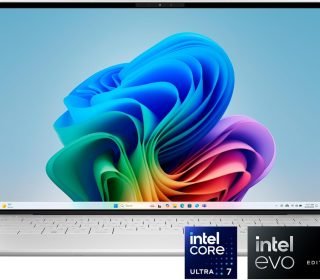
The Dell XPS 13 (9350) stands out as a Copilot+ PC with Intel Core Ultra 7 Series 2 processing, 32GB RAM, 1TB SSD, and a sharp 13.4-inch FHD+ 120Hz display in a sleek Platinum finish. This lightweight Windows 11 Home laptop emphasizes AI-ready performance, long battery life, and superior build quality at £1,549.
Introduction
Ultrabooks like the XPS 13 (9350) target professionals and creators who demand portability without sacrificing speed. Powered by the Intel Core Ultra 7 258V—part of the Evo Edition family—it delivers responsive multitasking, AI acceleration via Copilot, and Intel Arc graphics for light editing. The InfinityEdge design keeps it slim at under 15mm thick, ideal for travel or office use in demanding environments.
With a UK Qwerty backlit keyboard and fingerprint reader, it’s tailored for productivity on the go. This review assesses if its premium price justifies the specs for everyday buyers.
Key Features
Dell packs flagship tech into this compact chassis, prioritizing efficiency and visuals.
Processor: Intel Core Ultra 7 258V (8 cores, 12MB cache, up to 4.8GHz) with NPU for AI tasks.
Graphics: Integrated Intel Arc Graphics for smooth 1080p content creation and media.
Memory & Storage: 32GB LPDDR5X RAM and 1TB PCIe SSD for seamless workflows.
Display: 13.4″ FHD+ (1920×1200) IPS with 120Hz refresh, 500 nits brightness, anti-glare.
Extras: Windows Hello biometrics, FHD webcam, Thunderbolt 4 ports, McAfee Premium included.
These enable all-day use with fast charging and Copilot optimizations.
Pros and Cons
The XPS excels in refinement but carries premium pricing and minor compromises.
Pros:
Exceptional battery life (up to 18+ hours light use) via Evo certification.
Vibrant 120Hz FHD+ screen with high brightness for versatile viewing.
Blazing 32GB RAM/1TB SSD handles heavy apps like Photoshop effortlessly.
AI features shine with Core Ultra NPU for Copilot and noise reduction.
Ultra-premium Platinum build feels luxurious and durable.
Cons:
Integrated Arc graphics limit gaming/heavy renders (no dedicated GPU).
Only two Thunderbolt 4 ports restrict connectivity.
Keyboard draws mixed feedback on travel/feel.
£1,549 price feels high vs. larger-screen alternatives.
Premium polish wins for mobile pros.
Detailed Review
The Intel Core Ultra 7 258V—8-core Lunar Lake chip—powers demanding tasks with efficiency, hitting Geekbench multicore scores around 10,800 for quick exports and AI inference. Paired with 32GB LPDDR5X, it juggles 50+ tabs, VS Code, and Zoom without lag, while the 1TB SSD boots Windows 11 in seconds.
The 13.4″ FHD+ 120Hz IPS panel impresses with fluid scrolling, 500 nits for outdoors, and InfinityEdge bezels maximizing screen real estate. Colors pop at 100% sRGB, suiting photo tweaks or presentations. Arc Graphics handles 4K video playback and light Premiere edits capably, though not for 3D modeling.
Build quality radiates luxury: Platinum aluminum-magnesium alloy weighs ~1.2kg, with a haptic touchpad and backlit keys. Battery endures 15-20 hours video, 10-12 hours productivity—top-tier for Copilot+ PCs. Ports (2x TB4) support daisy-chaining, but add a dock for more. Webcam delivers sharp 1080p with AI enhancements.
Windows 11 Copilot integrates seamlessly for task automation. Drawbacks? Keyboard lacks deep travel; fans whisper under load. Overall, it’s a refined daily driver for creators on the move.
Who Should Buy This Product
This XPS suits premium ultrabook seekers prioritizing battery and AI.
Buy if:
You need 18+ hour battery for travel/hybrid work.
AI tools like Copilot boost your productivity.
Compact 13.4″ with sharp display fits mobile lifestyles.
32GB RAM/1TB SSD handles pro apps without upgrades.
Avoid for gaming or port-heavy setups—consider 15-16″ models with discrete GPUs.
Comparison with Similar Products
In the £1,500 ultrabook tier, XPS leads on battery/display but trails on ports.
| Feature/Laptop | Dell XPS 13 9350 | Acer Aspire 16 A16-71GM | HP Victus 15-fa2007na |
|---|---|---|---|
| CPU | Ultra 7 258V | Ultra 5 125H | Core 7 240H |
| GPU | Intel Arc | RTX 3050 | RTX 5060 |
| RAM/Storage | 32GB LPDDR5X/1TB SSD | 16GB/1TB SSD | 24GB/1TB SSD |
| Display | 13.4″ FHD+ 120Hz | 16″ WUXGA 60Hz | 15.6″ FHD 144Hz |
| Battery (est. hours) | 15-20 | 6-8 | 6-8 |
| Weight | ~1.2kg | ~1.8kg | 2.29kg |
| Price (approx.) | £1,549 | £700 | £1,350 |
XPS dominates portability/AI; Acer/HP better for budget/graphics.
Frequently Asked Questions
Battery life for all-day use?
Yes—15-20 hours video/productivity; fast-charges to 80% in an hour.
Good for content creation?
Excellent for photo/video editing with Arc GPU and 32GB RAM.
Gaming capable?
Light esports (indies at 60FPS); not for AAA titles.
Ports sufficient?
Two TB4 cover most; USB-C hubs expand options.
Copilot+ features useful?
NPU accelerates AI like Live Captions, Studio Effects effectively.
Keyboard comfortable?
Backlit, responsive but shallow travel—adaptive for most.
Final Verdict
Dell XPS 13 (9350) merits 4.5/5 for its stellar battery, vivid 120Hz screen, and AI prowess in an iconic design. At £1,549, it’s a premium pick for pros valuing portability over raw power—ideal if ultrathin efficiency tops your list.
Affiliate Disclaimer: This article contains affiliate links. Purchases through them may earn a commission at no extra cost to you, supporting honest reviews. All opinions are my own.